

Open it
Press ⌃ ⌥ . from any app.How it works
1
Create or open a project
Press ⌘N to create a new project, or
⌘O to open an existing one (recently used folders
appear first). You can also use ⌘K to search your
recent projects by name.
2
Add agents
Press ⌘Return (or click +) to pick from 19+
supported agents — Claude Code, Codex, Gemini, Cursor, Grok, and more.
Each agent opens in its own terminal pane. Dax checks which agents are
installed on your machine and only shows the ones you have.
3
Split and arrange
Drag a pane toward the edge of another to split the space. A green
highlight shows where the split will land. Drag the divider afterward to
resize. Press Even Out Terminals to redistribute space evenly without
restarting anything.
Agent detection
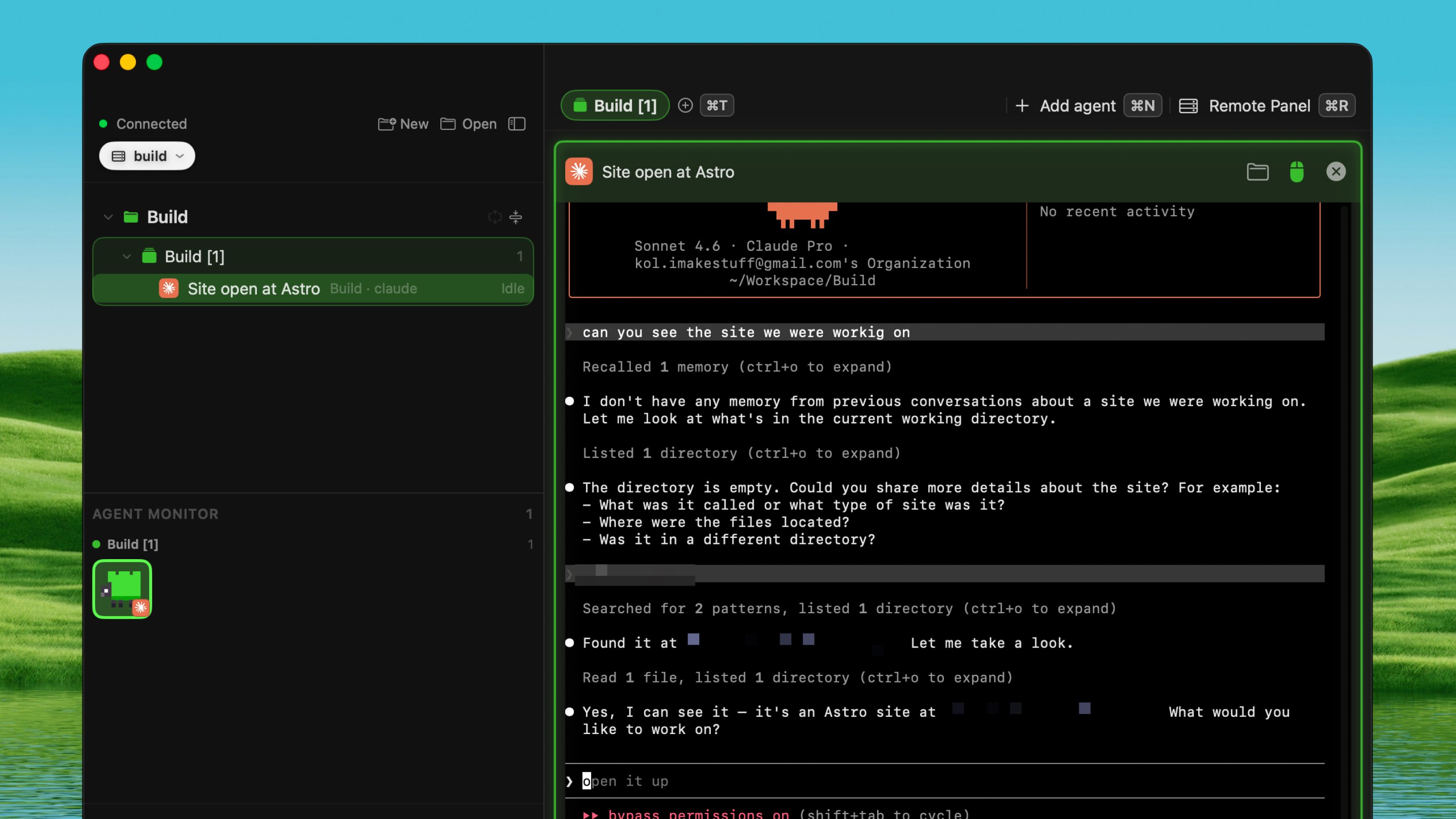
Shepherd detects 19+ coding agents out of the box: Claude Code, Codex, Gemini, Cursor, Grok, Pi, OpenCode, Devin, Copilot, Kimi, and more. When an agent is running in a pane, the sidebar shows:- Its brand icon (so you can tell agents apart at a glance)
- Its status: Working, Needs You (blocked and waiting for input), Done, or Idle
- A creature avatar — one of 21 pixel creatures assigned to each agent
Tabs
Organize your herd with tabs — each tab can hold multiple agents:- ⌘T — open a new tab
- ⌘Return — add an agent to the current tab
- ⌃Tab / ⌃⇧Tab — move between tabs
- ⌘W — close a single agent (not the whole window)
The sidebar
A tree view that shows everything at a glance:- Projects at the top level, with tabs underneath, and agents inside each tab
- Each agent shows its brand icon, creature avatar, and current status
- Rename anything — agents, tabs, projects
- Collapse the sidebar to an icons-only strip with ⌘B, or hide it completely
- The Agent Monitor groups agents into buckets: Needs You, Working, Done, Idle
Jumping between agents
Press ⌘J to open the jump picker — a searchable list of every agent, tab, and folder. Type a few letters, press Return, and you land on that agent instantly. You can also navigate between panes with arrow keys: ⌘← ⌘→ ⌘↑ ⌘↓.Terminal features
Every pane is a real terminal — not a preview or a mirror:- Split panes — drag to split left, right, top, or bottom
- Zoom a pane — press ⌘M to give one agent the whole tab, press again to go back
- Font size — ⌘+ to enlarge, ⌘- to shrink, ⌘0 to reset
- Copy & paste — ⌘C to copy, ⌘V to paste
- Scroll passthrough — toggle with ⌘S to let the scroll wheel reach the agent or keep it for yourself
- Terminal opacity — adjust the glass transparency in Settings (default is fully opaque for readability)
- Link clicking — Shepherd detects URLs in terminal output (even multi-line ones) so you can click them
Auto-naming panes
If you have Apple Intelligence enabled, Shepherd reads the terminal output and automatically names each pane based on what the agent is working on. The name updates as the agent moves to new tasks. You can always rename a pane manually — the manual name sticks.File browser
Press ⌘E to open a file browser inside Shepherd — no need to switch to Finder:- Browse your project folder with a Recent column and a Files column
- Press Space on any file for a Quick Look preview
- Press Return to open a file
- Switch between grid and list view
- On a remote server, files are downloaded automatically when you open them
Going full screen
Press ⌘F to fill the screen. Unlike macOS full screen, the menu bar and Dock stay visible — a wall of terminals doesn’t cost you the rest of your Mac.Sessions persist
Your agents keep running even when you:- Close the Shepherd window — reopen and they’re still there
- Quit Dax entirely — your sessions survive because Herdr runs as a background service
- Switch between machines — each machine’s herd is parked, not destroyed
Switching machines
Press ⌘L to open the machine picker — a card showing your Mac and every server you’ve connected. Switching cross-fades between machines instead of cutting, and the herd you leave behind is parked so switching back is instant. You can type to filter machines by name, or use arrow keys to navigate.Running on a server
Connect a server and Shepherd reaches it over a single SSH connection — same window, same tabs, same agents, running on the machine that has the repo, the RAM, and the uptime.1
Add a server
Go to Settings → Herdr → Servers and add a host: address, user, port,
and a key file or password. Passwords are stored in your Mac’s Keychain.
Invisible characters from cloud console copy-paste are cleaned
automatically, and key file permissions are narrowed for you.
2
Switch to the server
Press ⌘L and pick the server. Its projects and live
terminals appear exactly as local ones do.
3
Test the connection
Press Test to see the full connection flow: which address answered,
which key was offered, what the server accepted. Copy the log if you need
to debug.
4
Herdr installs automatically
If the server doesn’t have Herdr yet, Dax installs it for you. On
IPv6-only servers where GitHub is unreachable, Dax sends the binary over
the SSH connection that’s already open.
Your
~/.ssh/config, SSH agent, and known_hosts all still apply. Nothing
new is installed on your Mac — everything goes through the standard SSH
connection.Remote Panel
Press ⌘R (only shown when connected to a server) to open the Remote Panel — a dashboard for your server with five tabs:- Coding Agents — see what’s installed, install missing agents with one click, and update existing ones
- Services & Ports — every listening service and open port, with start/stop controls
- Web Servers & SSL — sites grouped by domain, with certificate details and expiry dates
- Usage — disk, memory, load, and a live console
- Utilities — common server tools you can launch with one click
Installing agents on servers
When you connect to a server for the first time, Shepherd checks which coding agents are installed. If any are missing, it offers to install them for you — no need to SSH in separately and run setup scripts.Creatures
Every agent gets a pixel creature — one of 21 characters across four biomes (aquatic, forest, ground, nocturnal). The creature is assigned based on the agent’s terminal, so it stays consistent. Creatures appear in the sidebar and in the flock view.Settings
Settings → Herdr lets you configure:- Default agent — which agent to add when you press ⌘T
- Skip permission prompts — let agents run without asking (YOLO mode)
- Terminal font size — default size for new panes
- Terminal opacity — how transparent the terminal background is
- Scroll passthrough — whether the scroll wheel reaches the agent
- Pane title summarization — auto-name panes using Apple Intelligence
- Tab color scheme — color by tab or by folder
- File browser view — grid or list
- Projects folder — where new projects are created
- Upload pasted files — automatically upload files pasted into remote terminals